Egress 제어 구현
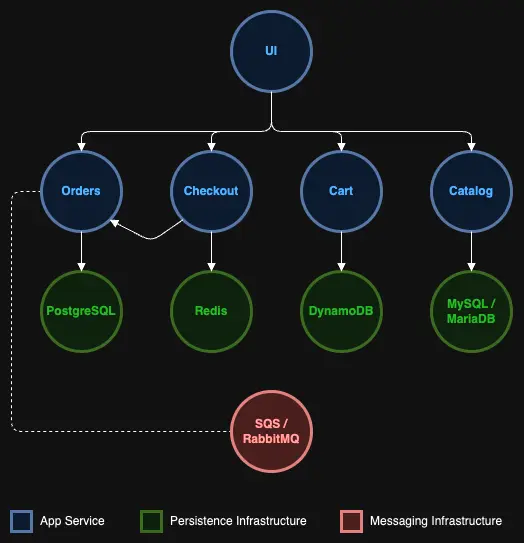
위의 아키텍처 다이어그램에서 보듯이, 'ui' 컴포넌트는 사용자 대면 애플리케이션입니다. 따라서 'ui' 네임스페이스에서 모든 egress 트래픽을 차단하는 네트워크 정책을 정의하여 'ui' 컴포넌트에 대한 네트워크 제어 구현을 시작할 수 있습니다.
kind: NetworkPolicy
apiVersion: networking.k8s.io/v1
metadata:
  name: default-deny
spec:
  podSelector:
    matchLabels: {}
  policyTypes:
    - Egress
빈 셀렉터 {}는 모든 Pod와 일치합니다
Egress 정책 타입은 Pod로부터의 아웃바운드 트래픽을 제어합니다
참고 : 네트워크 정책에 네임스페이스가 지정되지 않았습니다. 이는 클러스터의 모든 네임스페이스에 잠재적으로 적용될 수 있는 일반 정책이기 때문입니다.
이제 'ui' 컴포넌트에서 'catalog' 컴포넌트로 접근해 보겠습니다.
% Total % Received % Xferd Average Speed Time Time Time Current
Dload Upload Total Spent Left Speed
0 0 0 0 0 0 0 0 --:--:-- 0:00:03 --:--:-- 0
curl: (28) Resolving timed out after 5000 milliseconds
command terminated with exit code 28
curl 명령을 실행하면 아래와 같은 출력이 표시되어야 하며, 이는 'ui' 컴포넌트가 이제 'catalog' 컴포넌트와 직접 통신할 수 없음을 보여줍니다.
curl: (28) Resolving timed out after 3000 milliseconds
위 정책을 구현하면 'ui' 컴포넌트가 'catalog' 서비스 및 기타 서비스 컴포넌트에 접근해야 하므로 샘플 애플리케이션이 더 이상 제대로 작동하지 않게 됩니다. 'ui' 컴포넌트에 대한 효과적인 egress 정책을 정의하려면 컴포넌트의 네트워크 종속성을 이해해야 합니다.
'ui' 컴포넌트의 경우, 'catalog', 'orders' 등과 같은 다른 모든 서비스 컴포넌트와 통신해야 합니다. 이 외에도 'ui'는 클러스터 시스템 네임스페이스의 컴포넌트와 통신할 수 있어야 합니다. 예를 들어, 'ui' 컴포넌트가 작동하려면 DNS 조회를 수행할 수 있어야 하며, 이를 위해서는 kube-system 네임스페이스의 CoreDNS 서비스와 통신해야 합니다.
아래 네트워크 정책은 위의 요구 사항을 염두에 두고 설계되었습니다.
kind: NetworkPolicy
apiVersion: networking.k8s.io/v1
metadata:
  namespace: ui
  name: allow-ui-egress
spec:
  podSelector:
    matchLabels:
      app.kubernetes.io/name: ui
  policyTypes:
    - Egress
  egress:
    - to:
        - namespaceSelector:
            matchLabels:
          podSelector:
            matchLabels:
              app.kubernetes.io/component: service
        - namespaceSelector:
            matchLabels:
              kubernetes.io/metadata.name: kube-system
첫 번째 egress 규칙은 'catalog', 'orders' 등과 같은 모든 service 컴포넌트(데이터베이스 컴포넌트에 대한 접근 제공 없이)로의 egress 트래픽 허용에 중점을 두며, namespaceSelector와 함께 Pod 레이블이 app.kubernetes.io/component: service와 일치하는 한 모든 네임스페이스로의 egress 트래픽을 허용합니다
두 번째 egress 규칙은 kube-system 네임스페이스의 모든 컴포넌트로의 egress 트래픽 허용에 중점을 두며, 이를 통해 DNS 조회 및 시스템 네임스페이스의 컴포넌트와의 기타 주요 통신이 가능합니다
이 추가 정책을 적용해 보겠습니다:
이제 'catalog' 서비스에 연결할 수 있는지 테스트할 수 있습니다:
OK
출력에서 볼 수 있듯이, 이제 'catalog' 서비스에 연결할 수 있지만 app.kubernetes.io/component: service 레이블이 없기 때문에 데이터베이스에는 연결할 수 없습니다:
% Total % Received % Xferd Average Speed Time Time Time Current
Dload Upload Total Spent Left Speed
0 0 0 0 0 0 0 0 --:--:-- 0:00:05 --:--:-- 0
* Failed to connect to catalog-mysql.catalog port 3306 after 5000 ms: Timeout was reached
* Closing connection 0
curl: (28) Failed to connect to catalog-mysql.catalog port 3306 after 5000 ms: Timeout was reached
command terminated with exit code 28
마찬가지로, 연결할 수 있어야 하는 'order' 서비스와 같은 다른 서비스에 연결할 수 있는지 테스트할 수 있습니다. 그러나 인터넷이나 다른 타사 서비스에 대한 모든 호출은 차단되어야 합니다.
Trying XXX.XXX.XXX.XXX:80...
* Trying [XXXX:XXXX:XXXX:XXXX::XXXX]:80...
* Immediate connect fail for XXXX:XXXX:XXXX:XXXX::XXXX: Network is unreachable
curl: (28) Failed to connect to www.google.com port 80 after 5001 ms: Timeout was reached
command terminated with exit code 28
이제 'ui' 컴포넌트에 대한 효과적인 egress 정책을 정의했으므로, 'catalog' 네임스페이스로의 트래픽을 제어하기 위한 네트워크 정책을 구현하기 위해 catalog 서비스 및 데이터베이스 컴포넌트에 집중해 보겠습니다.