민감한 마운트를 가진 권한 있는 컨테이너
이 실습에서는 EKS 클러스터의 default 네임스페이스에서 루트 수준 액세스 권한을 가진 privileged Security Context로 컨테이너를 생성합니다. 이 권한 있는 컨테이너는 호스트의 민감한 디렉터리도 마운트하여 컨테이너 내부의 볼륨으로 액세스할 수 있습니다.
이 실습은 두 가지 다른 탐지 결과를 생성합니다. PrivilegeEscalation:Kubernetes/PrivilegedContainer는 권한이 있는 권한으로 컨테이너가 시작되었음을 나타내고, Persistence:Kubernetes/ContainerWithSensitiveMount는 민감한 외부 호스트 경로가 컨테이너 내부에 마운트되었음을 나타냅니다.
탐지 결과를 시뮬레이션하기 위해 이미 설정된 특정 파라미터가 있는 사전 구성된 매니페스트를 사용합니다:
apiVersion: v1
kind: Pod
metadata:
  name: ubuntu-privileged
spec:
  containers:
    - name: ubuntu-privileged
      image: ubuntu
      ports:
        - containerPort: 22
      securityContext:
        privileged: true
      volumeMounts:
        - mountPath: /host-etc
          name: host-etc
  volumes:
    - name: host-etc
      hostPath:
        path: /etc
  restartPolicy: Never
SecurityContext: privileged: true 설정은 Pod에 전체 루트 권한을 부여합니다
mountPath: /host-etc는 매핑된 호스트 볼륨이 컨테이너 내부의 /host-etc에서 액세스 가능하도록 지정합니다
path: /etc는 호스트 시스템의 /etc 디렉터리가 마운트의 소스 디렉터리가 되도록 지정합니다
다음 명령으로 위에 표시된 매니페스트를 적용합니다:
이 Pod는 한 번만 실행되며 Completed 상태에 도달할 때까지 실행됩니다
몇 분 내에 GuardDuty 탐지 결과 콘솔에서 두 가지 탐지 결과 PrivilegeEscalation:Kubernetes/PrivilegedContainer와 Persistence:Kubernetes/ContainerWithSensitiveMount를 볼 수 있습니다.
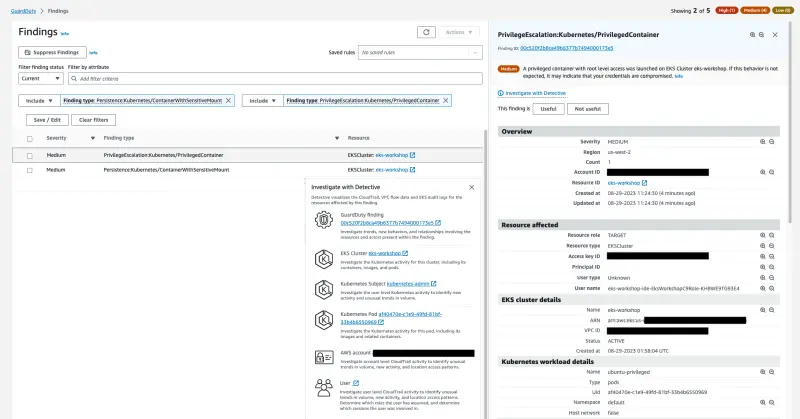
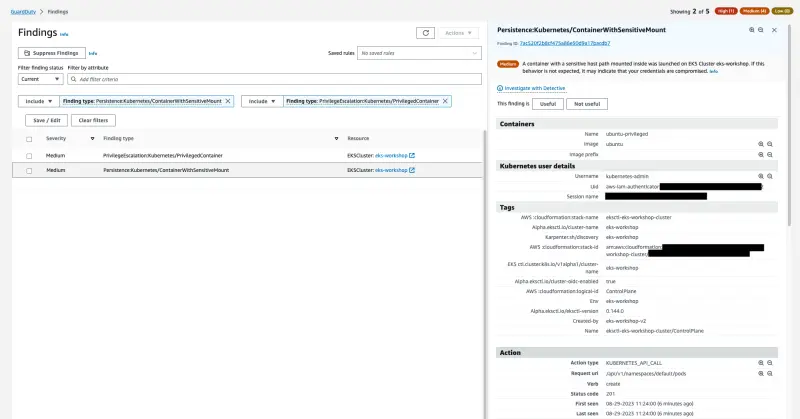
다시 한 번 탐지 결과 세부 정보, Action, Detective 조사를 분석하는 시간을 가지세요.
아래 명령을 실행하여 Pod를 정리합니다: