Kubernetes 이벤트
이 섹션에서는 Kubernetes 이벤트를 OpenSearch로 내보내고 OpenSearch를 사용하여 EKS 클러스터의 관측 가능성을 향상시키는 방법을 보여줍니다. Kubernetes 이벤트 내보내기를 배포하여 이벤트를 OpenSearch로 전달하고, 테스트 워크로드를 생성하여 추가 Kubernetes 이벤트를 생성하고, OpenSearch Kubernetes 이벤트 대시보드를 탐색하며, 문제를 식별하고, 선택적으로 Kubernetes 클러스터 내에서 이벤트를 탐색합니다.
Kubernetes Events는 애플리케이션 및 클러스터 상태를 모니터링하고, 장애에 대응하며, 진단을 수행하는 데 사용할 수 있는 풍부한 정보 소스를 제공합니다. 이벤트는 일반적으로 일부 상태 변경을 나타냅니다. 예를 들어 Pod 생성, 레플리카 추가 및 리소스 스케줄링이 포함됩니다. 각 이벤트에는 성공 또는 실패를 나타내기 위해 Normal 또는 Warning으로 설정된 type 필드가 포함됩니다.
리소스에서 kubectl describe를 실행한 적이 있다면 이미 Kubernetes 이벤트를 다뤄본 것입니다. 아래와 같이 kubectl describe 출력의 마지막 섹션에는 리소스와 관련된 Kubernetes 이벤트가 표시됩니다.
kubectl describe pod nginx
...
Events:
  Type    Reason     Age   From               Message
  ----    ------     ----  ----               -------
  Normal  Scheduled  5s    default-scheduler  Successfully assigned default/nginx to ip-10-42-179-183.us-west-2.compute.internal
  Normal  Pulling    4s    kubelet            Pulling image "nginx"
  Normal  Pulled     4s    kubelet            Successfully pulled image "nginx" in 627.545722ms (627.553403ms including waiting)
  Normal  Created    4s    kubelet            Created container nginx
  Normal  Started    3s    kubelet            Started container nginx
Kubernetes 이벤트는 지속적으로 생성되지만 클러스터 내에서 1시간 동안만 보관됩니다. 이 보관 기간은 Kubernetes 업스트림 기본 이벤트 TTL(Time-To-Live) 60분과 일치합니다. OpenSearch는 이러한 이벤트의 수집, 분석 및 시각화를 단순화하는 영구 저장소를 제공합니다.
다음 다이어그램은 이 섹션의 설정에 대한 개요를 제공합니다. kubernetes-events-exporter가 opensearch-exporter 네임스페이스에 배포되어 이벤트를 OpenSearch 도메인으로 전달합니다. 이벤트는 OpenSearch의 eks-kubernetes-events 인덱스에 저장됩니다. 앞서 로드한 OpenSearch 대시보드를 사용하여 이벤트를 시각화합니다.

Kubernetes 이벤트 내보내기를 배포하고 OpenSearch 도메인으로 이벤트를 전송하도록 구성합니다. 기본 구성은 여기에서 확인할 수 있습니다. 앞서 검색한 OpenSearch 자격 증명을 사용하여 내보내기를 구성합니다. 두 번째 명령은 Kubernetes 이벤트 Pod가 실행 중인지 확인합니다.
...
NAME: events-to-opensearch
LAST DEPLOYED: Fri Oct 20 01:04:56 2023
NAMESPACE: opensearch-exporter
...
NAME READY STATUS RESTARTS AGE
events-to-opensearch-kubernetes-event-exporter-67fc698978-2f9wc 1/1 Running 0 10s
이제 Normal 및 Warning 이벤트를 보여주기 위해 test 네임스페이스 내에서 scenario-a, scenario-b 및 scenario-c로 레이블이 지정된 세 개의 배포를 시작하여 추가 Kubernetes 이벤트를 생성합니다. 각 배포에는 의도적으로 오류가 포함되어 있습니다.
namespace/test created
secret/some-secret created
deployment.apps/scenario-a created
deployment.apps/scenario-b created
deployment.apps/scenario-c created
이전 단계에서 시작한 Kubernetes 이벤트 내보내기는 지난 1시간 동안의 이벤트와 새로운 이벤트를 OpenSearch로 전송합니다. 따라서 다음 명령을 실행하고 OpenSearch 대시보드를 검사할 때 표시되는 정확한 이벤트 목록은 지난 1시간 동안의 EKS 클러스터 활동에 따라 달라집니다.
이전 페이지에서 사용한 OpenSearch 대시보드로 돌아가서 OpenSearch Kubernetes 이벤트 대시보드를 탐색합니다. 앞서 본 대시보드 랜딩 페이지에서 Kubernetes 이벤트 대시보드에 액세스하거나 아래 명령을 사용하여 좌표를 가져옵니다:
Kubernetes Events dashboard: <OpenSearch Dashboard URL>
Username: <user name>
Password: <password>
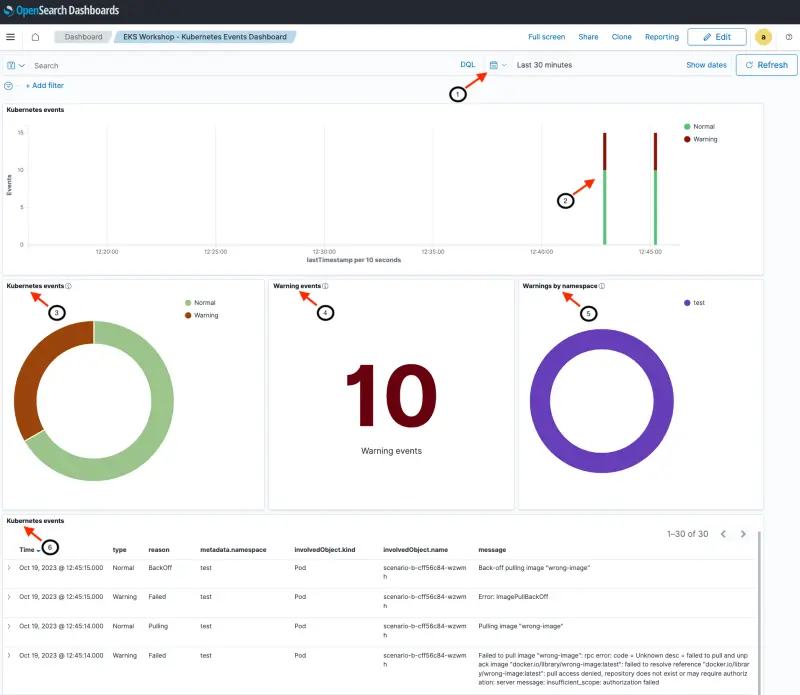
실시간 대시보드는 아래 이미지와 유사하게 보이지만 클러스터 활동에 따라 숫자와 메시지가 다를 수 있습니다. 대시보드 섹션 및 필드에 대한 설명은 다음과 같습니다.
- [헤더] 날짜/시간 범위를 표시합니다. 이 대시보드로 탐색하는 시간 범위를 사용자 지정할 수 있습니다(이 예에서는 최근 30분)
- [상단 섹션] 이벤트의 날짜 히스토그램(Normal 및 Warning 이벤트로 구분)
- [중간 섹션] Kubernetes 이벤트는 총 이벤트 수를 표시합니다(Normal 및 Warning)
- [중간 섹션] 선택한 시간 간격 동안 표시된 Warning 이벤트
- [중간 섹션] 네임스페이스별로 분류된 Warning. 이 예에서는 모든 경고가
test네임스페이스에 있습니다 - [하단 섹션] 가장 최근 이벤트가 먼저 표시되는 상세 이벤트 및 메시지
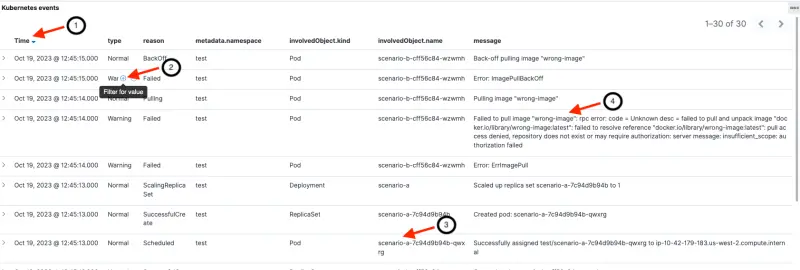
다음 이미지는 다음을 포함한 이벤트 세부 정보가 있는 하단 섹션에 초점을 맞춥니다:
- 이벤트의 마지막 타임스탬프
- 이벤트 유형(normal 또는 warning). 필드 위로 마우스를 가져가면 해당 값으로 필터링할 수 있습니다(예: Warning 이벤트 필터링)
- Kubernetes 리소스 이름(객체 유형 및 네임스페이스와 함께)
- 사람이 읽을 수 있는 메시지
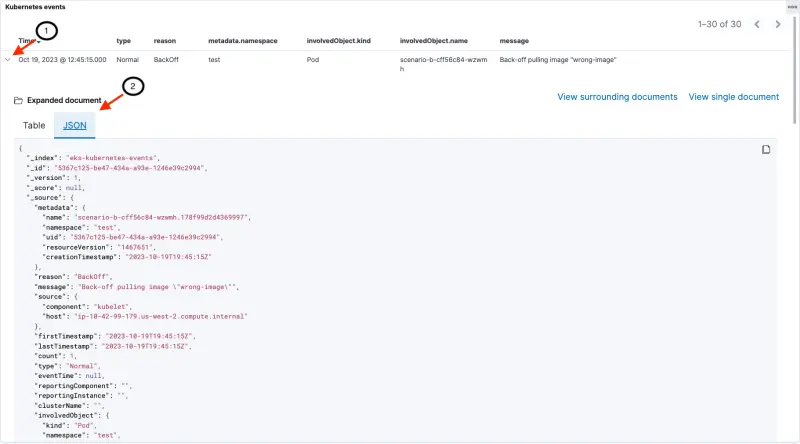
다음 이미지와 같이 전체 이벤트 세부 정보를 드릴다운할 수 있습니다:
- 각 이벤트 옆의 '>'를 클릭하면 새 섹션이 열립니다
- 전체 이벤트 문서를 테이블 또는 JSON 형식으로 볼 수 있습니다
Kubernetes 이벤트 내의 데이터 필드에 대한 설명은 kubernetes.io에서 찾을 수 있으며 kubectl explain events를 실행하여 확인할 수도 있습니다.
Kubernetes 이벤트 대시보드를 사용하여 세 가지 배포(scenario-a, scenario-b 및 scenario-c)가 문제를 겪고 있는 이유를 식별할 수 있습니다. 앞서 배포한 모든 Pod는 test 네임스페이스에 있습니다.
scenario-a: 대시보드에서 scenario-a가 FailedMount의 이유를 가지고 있으며 메시지는 MountVolume.SetUp failed for volume "secret-volume" : secret "misspelt-secret-name" not found임을 확인할 수 있습니다. Pod가 존재하지 않는 Secret을 마운트하려고 시도하고 있습니다.

scenario-b: scenario-b는 Failed to pull image "wrong-image": rpc error: code = Unknown desc = failed to pull and unpack image "docker.io/library/wrong-image:latest": failed to resolve reference "docker.io/library/wrong-image:latest": pull access denied, repository does not exist or may require authorization: server message: insufficient_scope: authorization failed. 메시지와 함께 실패했습니다. Pod가 존재하지 않는 이미지를 참조하기 때문에 생성되지 않습니다.

scenario-c: 대시보드는 FailedScheduling의 이유와 0/3 nodes are available: 3 Insufficient cpu. preemption: 0/3 nodes are available: 3 No preemption victims found for incoming pod. 메시지를 표시합니다. 이 배포는 현재 클러스터 노드 중 어느 것도 제공할 수 없는 CPU를 요청하고 있습니다. (이 EKS 워크샵 모듈에서는 클러스터 오토스케일링 기능이 활성화되어 있지 않습니다.)

문제를 수정하고 OpenSearch 대시보드를 다시 방문하여 변경 사항을 확인합니다
namespace/test unchanged
secret/some-secret unchanged
deployment.apps/scenario-a configured
deployment.apps/scenario-b configured
deployment.apps/scenario-c configured
OpenSearch 대시보드로 돌아가서 이전 문제가 해결되었는지 확인합니다. 업데이트된 배포는 성공적인 새 Pod를 시작하고 이전에 생성된 Pod(오류 있음)는 삭제됩니다.
문제가 수정되면 새로운 Normal Kubernetes 이벤트 세트가 생성됩니다. 이전 이벤트(Normal 또는 Warning)는 기록의 일부로 유지됩니다. 따라서 Normal 및 Warning 이벤트의 수는 항상 _증가_합니다.
선택적으로 EKS 클러스터 내에서 Kubernetes 이벤트를 탐색할 수 있습니다. OpenSearch 대시보드 내에서 탐색한 이벤트는 클러스터 내에서 사용 가능한 정보를 반영합니다.
클러스터에서 가장 최근의 5개 이벤트를 검색합니다.
NAMESPACE LAST SEEN TYPE REASON OBJECT MESSAGE
catalog 44m Normal SuccessfulCreate replicaset/catalog-857f89d57d Created pod: catalog-857f89d57d-xl4xc
orders 44m Normal Scheduled pod/orders-5696b978f5-gk2d7 Successfully assigned orders/orders-5696b978f5-gk2d7 to ip-10-42-104-177.us-west-2.compute.internal
ui 44m Normal Scheduled pod/ui-5dfb7d65fc-7l94z Successfully assigned ui/ui-5dfb7d65fc-7l94z to ip-10-42-190-29.us-west-2.compute.internal
warning 또는 failed 상태의 이벤트를 확인합니다.
NAMESPACE LAST SEEN TYPE REASON OBJECT MESSAGE
orders 44m Warning Unhealthy pod/orders-5696b978f5-gk2d7 Readiness probe failed: Get "http://10.42.127.4:8080/actuator/health/liveness": dial tcp 10.42.127.4:8080: connect: connection refused
test 7m6s Warning FailedScheduling pod/scenario-c-6d988b8d84-gghjv 0/3 nodes are available: 3 Insufficient cpu. preemption: 0/3 nodes are available: 3 No preemption victims found for incoming pod.
test 6m39s Warning Failed pod/scenario-b-cff56c84-xn9hh Error: ImagePullBackOff
test 6m28s Warning Failed pod/scenario-b-cff56c84-xn9hh Failed to pull image "wrong-image": rpc error: code = Unknown desc = failed to pull and unpack image "docker.io/library/wrong-image:latest": failed to resolve reference "docker.io/library/wrong-image:latest": pull access denied, repository does not exist or may require authorization: server message: insufficient_scope: authorization failed
가장 최근 이벤트(모든 네임스페이스에서)를 JSON 형식으로 확인합니다. 출력이 OpenSearch 인덱스 내에서 찾은 세부 정보와 매우 유사함을 확인하십시오. (OpenSearch 문서에는 OpenSearch 내에서 인덱싱을 용이하게 하는 추가 필드가 있습니다.)
{"apiVersion": "v1",
"count": 1,
"eventTime": null,
"firstTimestamp": "2023-10-19T21:49:44Z",
"involvedObject": {"apiVersion": "apps/v1",
"kind": "Deployment",
"name": "scenario-c",
"namespace": "test",
"resourceVersion": "1485908",
"uid": "7b12f29b-2c83-4b3b-8aa3-a4c8b22d8a38"
},
"kind": "Event",
"lastTimestamp": "2023-10-19T21:49:44Z",
"message": "Scaled down replica set scenario-c-6d988b8d84 to 0 from 1",
"metadata": {"creationTimestamp": "2023-10-19T21:49:44Z",
"name": "scenario-c.178fa09ddad7c5e3",
"namespace": "test",
"resourceVersion": "1485955",
"uid": "e56aa6b2-9808-45a8-8863-ec9112f23822"
},
"reason": "ScalingReplicaSet",
"reportingComponent": "deployment-controller",
"reportingInstance": "",
"source": {"component": "deployment-controller"
},
"type": "Normal"
}