ALB가 생성되지 않음
이 트러블슈팅 시나리오에서는 AWS Load Balancer Controller가 Ingress 리소스에 대한 Application Load Balancer(ALB)를 생성하지 않는 이유를 조사합니다. 이 실습을 마치면 아래 이미지와 같이 ALB Ingress를 통해 UI 애플리케이션에 액세스할 수 있게 됩니다.
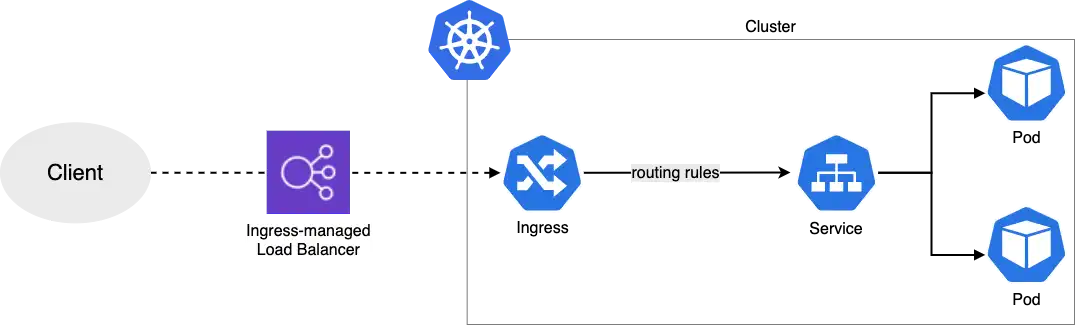
트러블슈팅 시작
1단계: 애플리케이션 상태 확인
먼저 UI 애플리케이션의 상태를 확인해보겠습니다:
NAME READY STATUS RESTARTS AGE
ui-68495c748c-jkh2z 1/1 Running 0 85s
2단계: Ingress 상태 확인
Ingress 리소스를 확인해보겠습니다. ADDRESS 필드가 비어 있는 것을 주목하세요 - 이는 ALB가 생성되지 않았음을 나타냅니다:
NAME CLASS HOSTS ADDRESS PORTS AGE
ui alb * 80 105s
성공적인 배포에서는 다음과 같이 ADDRESS 필드에 ALB DNS 이름이 표시됩니다:
NAME   CLASS   HOSTS   ADDRESS                                                    PORTS   AGE
ui     alb     *      k8s-ui-ingress-xxxxxxxxxx-yyyyyyyyyy.region.elb.amazonaws.com   80   2m32s
3단계: Ingress 이벤트 조사
Ingress와 관련된 이벤트를 살펴보고 ALB 생성이 실패한 이유를 파악해보겠습니다:
Name: ui
Labels: <none>
Namespace: ui
Address:
Ingress Class: alb
Default backend: <default>
Rules:
Host Path Backends
---- ---- --------
*
/ service-ui:80 (<error: endpoints "service-ui" not found>)
Annotations: alb.ingress.kubernetes.io/healthcheck-path: /actuator/health/liveness
alb.ingress.kubernetes.io/scheme: internet-facing
alb.ingress.kubernetes.io/target-type: ip
Events:
Type Reason Age From Message
---- ------ ---- ---- -------
Warning FailedBuildModel 2m23s (x16 over 5m9s) ingress Failed build model due to couldn't auto-discover subnets: unable to resolve at least one subnet (0 match VPC and tags: [kubernetes.io/role/elb])
오류는 AWS Load Balancer Controller가 로드 밸런서와 함께 사용할 수 있도록 태그가 지정된 서브넷을 찾을 수 없음을 나타냅니다. 다음은 EKS와 ALB를 올바르게 설정하는 문서입니다.
4단계: 서브넷 태그 수정
Load Balancer Controller는 퍼블릭 서브넷에 kubernetes.io/role/elb=1 태그가 지정되어 있어야 합니다. 올바른 서브넷을 식별하고 태그를 지정해보겠습니다:
4.1 클러스터의 서브넷 찾기
[
"subnet-xxxxxxxxxxxxxxxxx",
"subnet-xxxxxxxxxxxxxxxxx",
"subnet-xxxxxxxxxxxxxxxxx",
"subnet-xxxxxxxxxxxxxxxxx",
"subnet-xxxxxxxxxxxxxxxxx",
"subnet-xxxxxxxxxxxxxxxxx"
]
4.2. 라우팅 테이블을 확인하여 어떤 서브넷이 퍼블릭인지 식별
라우팅 테이블 CLI 필터에 서브넷 ID를 하나씩 추가하여 어떤 서브넷이 퍼블릭인지 식별할 수 있습니다: --filters 'Name=association.subnet-id,Values=subnet-xxxxxxxxxxxxxxxxx'.
aws ec2 describe-route-tables --filters 'Name=association.subnet-id,Values=<ENTER_SUBNET_ID_HERE>' --query 'RouteTables[].Routes[].[DestinationCidrBlock,GatewayId]'
Subnet: subnet-xxxxxxxxxxxxxxxxx
10.42.0.0/16 local
0.0.0.0/0 igw-xxxxxxxxxxxxxxxxx
Subnet: subnet-xxxxxxxxxxxxxxxxx
10.42.0.0/16 local
0.0.0.0/0 igw-xxxxxxxxxxxxxxxxx
...
퍼블릭 서브넷은 Internet Gateway(igw-xxx)를 가리키는 0.0.0.0/0 라우트를 가지고 있습니다.
4.3. 현재 ELB 태그 상태 확인
[]
4.4. 퍼블릭 서브넷에 태그 지정 (편의를 위해 환경 변수에 저장했습니다)
4.5. 태그가 적용되었는지 확인
4.6. Load Balancer Controller를 재시작하여 새 서브넷 구성을 적용
deployment.apps/aws-load-balancer-controller restarted
4.7. Ingress 상태를 다시 확인
Warning FailedDeployModel 50s ingress Failed deploy model due to AccessDenied: User: arn:aws:sts::021629549003:assumed-role/alb-controller-20250216203332410200000002/1739739040072980120 is not authorized to perform: elasticloadbalancing:CreateLoadBalancer on resource: arn:aws:elasticloadbalancing:us-west-2:021629549003:loadbalancer/app/k8s-ui-ui-5ddc3ba496/* because no identity-based policy allows the elasticloadbalancing:CreateLoadBalancer action
status code: 403, request id: 33be0191-469b-4eff-840d-b5c9420f76c6
Warning FailedDeployModel 9s (x5 over 49s) ingress (combined from similar events): Failed deploy model due to AccessDenied: User: arn:aws:sts::021629549003:assumed-role/alb-controller-20250216203332410200000002/1739739040072980120 is not authorized to perform: elasticloadbalancing:CreateLoadBalancer on resource: arn:aws:elasticloadbalancing:us-west-2:021629549003:loadbalancer/app/k8s-ui-ui-5ddc3ba496/* because no identity-based policy allows the elasticloadbalancing:CreateLoadBalancer action
status code: 403, request id: a8d8f2c9-4911-4f3d-b4f3-81e2b0644e04
오류가 변경되었습니다 - 이제 해결해야 할 IAM 권한 문제가 표시됩니다:
Warning FailedDeployModel 68s ingress Failed deploy model due to AccessDenied: User: arn:aws:sts::xxxxxxxxxxxx:assumed-role/alb-controller-20240611131524228000000002/1718115201989397805 is not authorized to perform: elasticloadbalancing:CreateLoadBalancer
이는 다음 섹션에서 다룰 Load Balancer Controller의 IAM 권한을 수정해야 함을 나타냅니다.
CloudTrail에서 지난 한 시간 동안의 CreateLoadBalancer API 호출을 확인하여 ALB 생성 시도를 확인할 수 있습니다.